Showing posts with label Features. Show all posts

Tuesday, January 21, 2014

Install the new User Interface for Oracle Case Management 11.1.1.7

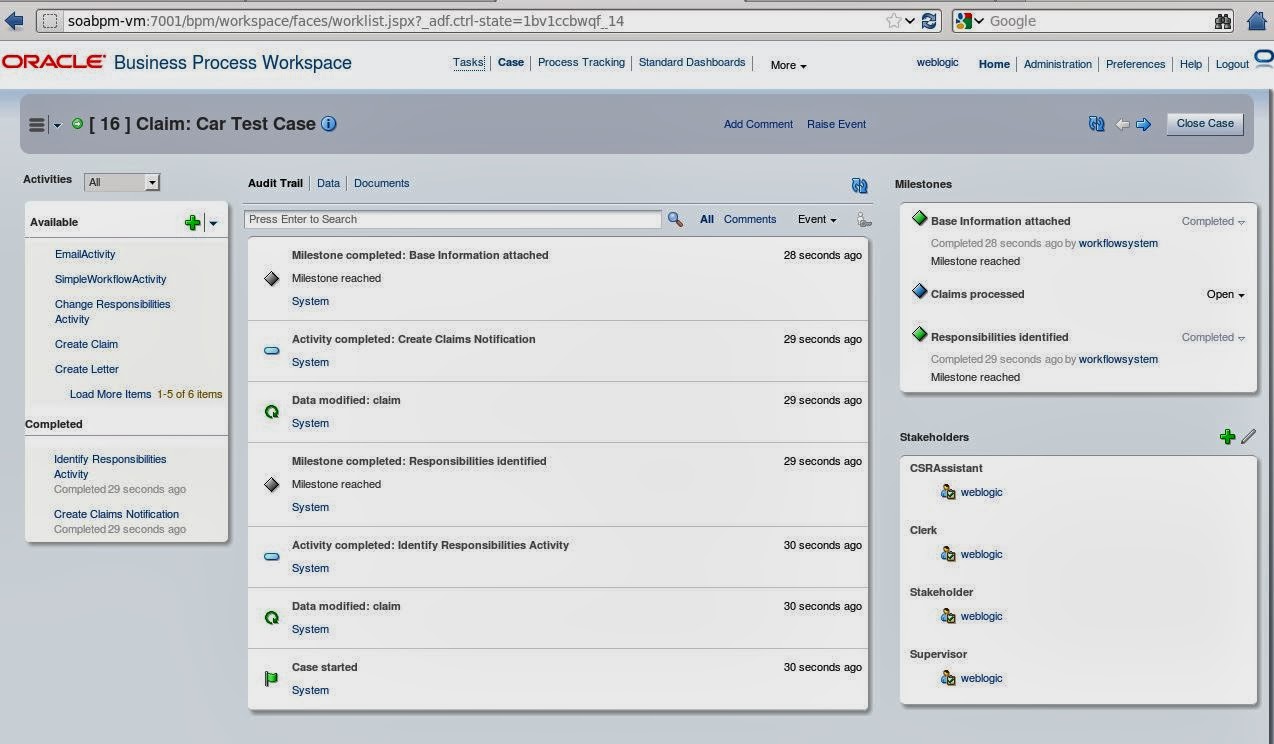
For all Oracle BPM & Case Management users a new User Interface is available (see SOA Community Blog). Below I describe briefly how to install it on a BPM 11.1.1.7 environment.

To access the software please login to support.oracle.com and search for the following Patches:
  • Patch 17014142: SOA BUNDLE PATCH 11.1.1.7.1
  • Patch 17767877: CASE UI IN WORKSPACE

1) Read the README-files carefully and perform the following steps for both patches:

2) Set the ORACLE_HOME environment variable to SOA Home, eg:
export ORACLE_HOME=/u01/app/oracle/middleware/Oracle_SOA1/
Validate the result with => echo $ORACLE_HOME
 

3) Add the appropriate OPatch to the system path, eg::
export PATH=$PATH:/u01/app/oracle/middleware/Oracle_SOA1/OPatch
Validate the result with => which opatch
 

4) Run OPatch to apply the patch
opatch apply

Repeat the steps for the oracle_common-Home. Patch 17767877 needs to be applied on the Jdeveloper ORACLE_HOME as well.

NOTE: YOU MUST APPLY THE SAME PATCH TO SOA AND oracle_common HOMEs AT THE SAME TIME. YOU CANNOT APPLY JUST ONE AS THIS WILL CAUSE UNPREDICTABLE BEHAVIOR.

Additionally make sure that you installed:
  • Patch 14526899
  • Patch 14791221

These two patches can be installed via Smart Update Utility. Start the tool under [MW_HOME]/utils/bsu, copy the extracted patches into [MW_HOME]/utils/bsu/cache_dir and apply the patches.

If you performed all steps successfully, you should now be able to access your case instances from BPM workspace. Have fun with it!


Tuesday, December 10, 2013

Create a custom Case Activity in Oracle BPM Case Management

In one of my previous posts I highlighted the new case management functionalites in Oracle BPM Suite. Case management enables you to define the different activities - a user can perform to achieve a goal - without defining the workflow process. For more details about ACM I recommend to download our "Adaptive Case Management in Practice" poster and to read the following articles:


A case is always associated with activities which are performed as part of a particular case. Among milestones, data, events, stakeholders and documents the activities are a key element in Oracle BPM 11g Case Management. In the current release you can create case activities based on a BPM process, or a Human Task, or you can create a custom case activity based on a Java class. In this post I will explain the steps to create a custom case activity.

Create a Custom Case Activity


1. Create a new "BPM Application"
2. Create a new "BPM Project"
3. Create a "Composite with Case Management" component

The above steps will result in a composite with the case and its exposed service and case rules. Now you can open the case definition and define your milestones, stakeholders, permissions, data, user events and so on. See the step-by-step "Hello World" example for more details. The Custom Activity Java class must implement the oracle.bpm.casemgmt.caseactivity.ICaseActivityCallback interface. The callback class must be part of the composite (as explained below), or must add it to the workflow customization classpath.

4. Import the oracle.bpm.casemgmt.interface.jar from
<MW_HOME>/Oracle_SOA1/soa/modules/oracle.bpm.runtime_11.1.1/


5. Import the bpm-services.jar from
<MW_HOME>/Oracle_SOA1/soa/modules/oracle.soa.workflow_11.1.1/

6. Select File => New => Java Class and create the CustomCaseActivity Java class.


7. Organize imports and add your custom logic in the "initiate" operation.

package com.cattlecrew.acm.caseactivities;

import java.util.Map;

import oracle.bpm.casemgmt.CaseIdentifier;
import oracle.bpm.casemgmt.caseactivity.ICaseActivityCallback;
import oracle.bpel.services.bpm.common.IBPMContext;

public class CustomCaseActivity implements ICaseActivityCallback {
    public CustomCaseActivity() {
        super();
    }

    public String initiate(IBPMContext iBPMContext,
                           CaseIdentifier caseIdentifier, String string,
                           Map<String, Object> map) {
       
        // Add activity logic here
       
        return "Called class CustomCaseActivity for activity => " + string;
    }
}

8. Create the case activity based on the Java class. See chapter 31 of the Oracle Fusion Middleware Modeling and Implementation Guide for Oracle Business Process Management for more details about config options and guidelines.


9. Define your Business Rules.

10. Deploy and test the Case composite. 
Tuesday, November 5, 2013

Configure Auto-Recovery in Oracle SOA Suite

Oracle SOA Suite 11g has some great features to recover faulted instances automatically. When a BPEL process flow errors out, it is retried with all its invocations. This is undesirable in some cases. For example if re-calling a composite results in duplicated data, data have been changed before the recovery is planned to be executed or you do not want to create too many composite instances in order to save the space in your SOAINFRA-schema. See below the different places where automatic recoveries are configured / disabled.

1) Change RecurringScheduleConfig (see also the screenshot below) 
  • Right-click soa-infra (SOA_cluster_name) 
  • Choose SOA Administration > BPEL Properties 
  • Click "More BPEL Configuration Properties" 
  • Click "Recovery Config" 
  • Change values for RecurringScheduleConfig 
    • maxMessageRaiseSize = 0 
    • startWindowTime = 00:00 
    • stopWindowTime = 00:00 
  • Click Apply 

2) Change StartupScheduleConfig (see also the screenshot below)
  • Right-click soa-infra (SOA_cluster_name)
  • Choose SOA Administration > BPEL Properties
  • Click "More BPEL Configuration Properties"
  • Click "Recovery Config"
  • Change values forStartupScheduleConfig
    • maxMessageRaiseSize = 0
    • startupRecoveryDuration = 0
    • subsequentTriggerDelay = 0
  • Click Apply


3) Change GlobalTxMaxRetry
The property GlobalTxMaxRetry specifies how many retries are performed if an error is identified as a retriable one. For example, after several web service invocations, if dehydration fails due to a data source error, then this is identified as a retriable error and all activities from the prior dehydration state are retried. If the activities being retried are not idempotent (that is, their state can change with each retry and is not guaranteed to give the same behavior), then multiple retries can be problematic.

You can set GlobalTxMaxRetry to 0 in the Systems MBean Browser.
  • Right-click soa-infra (SOA_cluster_name)
  • Choose SOA Administration > Common Properties
  • Click "More SOA Infra Advanced Configuration Properties"
  • Click "GlobalTxMaxRetry"
  • In the Value field, enter an appropriate value
  • Click Apply

Additional Information

Friday, October 14, 2011

New BPM Suite 11.1.1.5 Feature Pack

by Manoj Das on Sep 27, 2011: The BPM product team is very pleased to announce that BPM Suite 11.1.1.5 Feature Pack is now publicly available. This feature pack includes many significant enhancements and new features. Some of the highlights of this release are:

More Business Friendly
  • Versions and Snapshots: From process composer, you can create and manage snapshots and see who changed what and when.
  • Sharing and Collaboration: An enhanced project-level sharing model and collaboration features showing who else is working on the project at any time
  • Improved Ease of Use: Their is a new project home that makes managing project and its artifacts much more intuitive. Also, improved properties window, editing cues, and many other enhancements targeted at business analysts.


New Business Analyst Features
  • Documentation (Report) Generation: Generate process documentation as HTML or XML. XML format may be used to create custom outputs.
  • BPMN 2.0 Collaboration View: Provide a collaboration diagram view based on BPMN 2.0 specification; available in both Composer and Studio.
More Agile
  • Alter Flow: Alter Flow lets an appropriately privileged user alter the execution of a process by changing the process data and/or moving it to a different activity.
  • Instance Patching: Change the definition of process and patch in-flight instances to the new definition

More Complete
  • Broader UCM Integration: Process and task attachments can be easily managed in UCM and related metadata can be set from BPM.
  • Advanced Services Integration: Some of the more advanced services integration capabilities available in our BPEL product such as message based correlation and ability of a process instance to converse with multiple instances of another process or service are now available in BPMN. (The BPMN features are Correlations and Conversations).
  • Richer Human Workflow: New features including parametric roles, organization unit based role selection, sticky-user based assignment, and support for 4-eye principle (if a person did one task exclude them from another task) were added. 
Richer Process Analytics
  • Round-trip Simulation – Create simulation scenarios based on run time data.
  • BI Integration: Process specific views are automatically created on top of the process STAR schema to facilitate analysis using Oracle BI or any other BI tool.
Something for Developers Too
  • Draft Mode: Develop process incrementally by marking activities as draft or test a process while a service is offline.
  • Custom Log: Add custom messages to be added to the BPM log and audit trail.
  • Rule Test Framework: Easily create and run test cases for testing business rules (see chapter 8 of doc).
  • Enhanced Rule Audit Trail: Rule audit trail shows much more information including state of facts, rule stack, etc.
  • Workspace Customization: Easier customization of Workspace including skinning, disabling standard tabs, more fetaure rich custom tabs, custom links, and ability to customize Inbox.
  • Documented BPM APIs: In addition to the fabric and workflow APIs, BPM APIs are also documented (see javadoc).
Download and More Info

For a more complete article on the new features in this release, link to the documentation, as well as instructions on downloading it see What’s New in BPM Suite 11.1.1.5 Feature Pack.