Showing posts with label Releases. Show all posts

Monday, April 1, 2013

New case management functionalities in Oracle BPM Suite 11.1.1.7

Today I’d like to highlight a nice feature of the newest Oracle BPM Suite Release. I am very happy that Oracle enriched the Suite with certain Case Management functionalities that fit into the existing Service Component Architecture (SCA). In the past month I already had the chance to play a bit with the beta software. With this post I’d like to share some of my experiences. 

Why Case Management?
Business Process Management becomes more and more important. With BPM Suite processes can be modeled, implemented, simulated and executed in a multi-user environment. There are also a lot of different reports available to monitor processes during runtime. We see in our projects, that this kind of automation is especially valuable for processes which are based on routine work. Some examples are “Hiring”, “Order-to-Cash”, “Order Management”, “Travel Request Management” and so on.

However - we also notice quite a high amount of processes, which are too complex and too flexible to model them in BPMN. We call it knowledge-intensive work. Of course if you have a lot of time you might be able to model almost everything but is it a benefit to have processes which are not readable anymore? How fast is your time-to-market? How easy is it to implement process changes? How can you support the job of the knowledge worker? Some typical domains with a high amount of knowledge-intensive work are Insurances, Banks, Healthcare, Civil Services and Government Agencies.

Let me try to explain the need of case management with our RYLC example. RYLC stands for “Rent your legacy car” and it was introduced in a series of articles as an overall solution example. The main target of RYLC was to explain concepts like service categories, loose coupling, canonical data model, service security and much more (see SOA Spezial magazine for details). The graphic below shows the complete End-to-End RYLC process in BPMN notation from receiving the request, selection of the car, checkout of the vehicle, returning it, creation of the invoice and cash clearance. I highlighted the checkin-part of the process, which covers the return of the car. It is based on an asynchronous message exchange pattern - the process execution stops until the checkin is completed or canceled. In this stage several things can happen.

BPMN Example - Rent your legacy car (RYLC)
The happy path of the process would be that everything goes well and the customer returns the car at the date that has been agreed during the reservation. The extension of the rental period can trigger other actions which are necessary to satisfy the customer. In worst-case the customer might have an accident or somebody steals the car.   

A lot of effort and time is necessary to bring all the mentioned varieties into the process. Examples like an accident will result in claim notifications and extended communication with the appropriate insurances. It is difficult to model each potential option. This is where Case Management comes into the game. It helps us to combine different milestones with the appropriate task actions, business rules, stakeholders, resulting events as well as data and documents (see the image below). During the car-checkin different milestones like “In Rental”, “Accident” (optional), “Stolen” (optional), “Returned” and “Approved” might occur. Each milestone consists of mandatory and optional task actions. Their execution order is defined by business rules. The task actions can be system driven (implemented as services) or user driven. Of course similar to BPMN some data and documents are exchanged in each step. Case Management is mainly controlled by the knowledge worker, which means that they affect the “flow” of the case. Therefore the definition of stakeholders and their permissions is another important aspect. Some example stakeholders in RYLC are the insurance holder, driver, car park assistant, front desk clerk and the rental manager. Based on the milestones and the task actions different events can occur that trigger new situations. Case management can support the knowledge worker with the right information (but the knowledge worker keeps the decision & process authority). Better and faster process decisions are the benefits of it.

Key aspects in Case Management
To conclude: Case Management covers complex and unstructured knowledge-intensive scenarios where modeling is too expensive and time consuming. It is non-deterministic, which means that the case flow is dynamically determined at run-time. The case participants choose actions to meet goals. It can be used to enrich existing processes (like in the RYLC example above) or as separate and independent solutions. 

How-to define a Case in Oracle BPM Suite?
In Oracle BPM Suite 11.1.1.7 the Case component is introduced as a first class artifact with support for milestones, events, adhoc activities stakeholders and so on. Like BPMN, BPEL, Human Task, Rules, etc. a Case can be created by just dropping it on the composite level. After completing the wizard a case component, a business rule component and an interface (exposed service) is visible (as illustrated in the image below).

Composite.xml with Case component
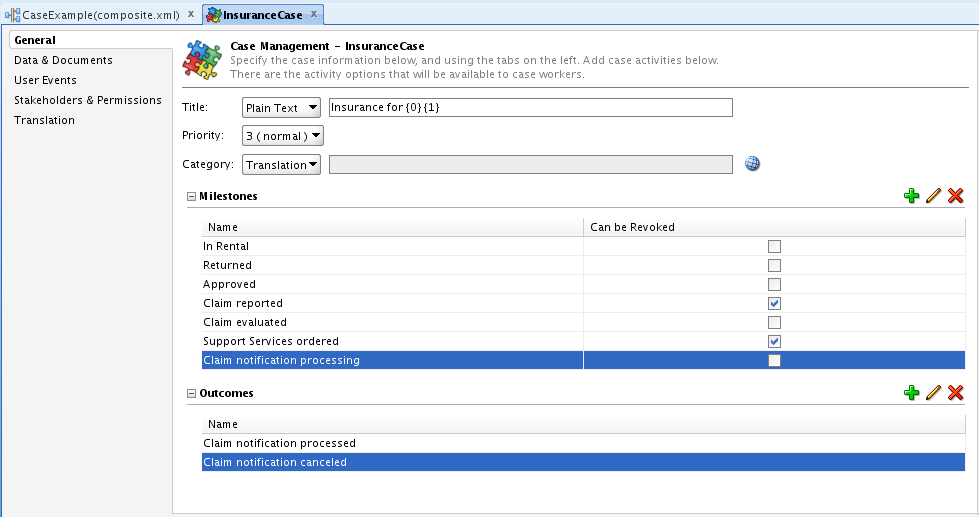
For now a composite can have only one Case component. Double-clicking on the case directs you to the definition of the component. Here you can define the milestones, case outcomes, data & documents, stakeholders & permissions, user events and translations. The image below shows how milestones and case outcomes can be defined.

Definition of a Case
Furthermore it is necessary to define and implement the case activities. I noticed two ways of creating them. Option 1 is to open the wizard under “New > BPM Tier” and select “Custom Case Activity”. Option 2 is to promote an existing component as a case activity. For the article I decided to go for option 2 – so I promoted the Human Task “Evaluate Claim Notification”. A case activity does have its own definition – a file with a *.caseactivity extension. You can find an example with some of the parameters available for customization on the bottom of the next screenshot.

Definition of a Case Activity
Additionally the business rule created along with the case component needs to be configured. It comes with a set of predefined functions (e.g. activateActivity, withdrawActivity, reachMilestone and revokeMilestone), Facts and Bucketsets (e.g. TEventType, TMilestoneEvent, etc.). The definition of rules is necessary to handle all the different situations of the case. Typical examples are ACTIVITY_EVENTS which trigger new activities or milestones, USER_DEFINED_EVENTS which have been specified in the case definition file or MILESTONE_EVENTS which trigger the appropriate case activities (see the screenshot below). There are many different options and I hope that some documentation material is going to be published soon.

Definition of a Case Rule
During runtime you can take advantage of the monitoring capabilities from the Enterprise Manager – as you might already know from BPMN or BPEL processes. How many case-instances have been started in which time frame?  Which milestones have been reached? Did there a fault occur? Which rules and which activities have been activated? The screenshot below shows the instance information of Oracle’s "EURent" Case Management example.

Monitoring of Case instances in EM
With the new Case Management functionalities BPM Suite confirms its outstanding position. I couldn’t wait to play with the software and I am really happy to demonstrate the new product capabilities to our customers. What I didn’t mention so far is the importance of user interfaces and tight integration with content management systems like WebCenter. So there is more to come :-)

Friday, October 14, 2011

New BPM Suite 11.1.1.5 Feature Pack

by Manoj Das on Sep 27, 2011: The BPM product team is very pleased to announce that BPM Suite 11.1.1.5 Feature Pack is now publicly available. This feature pack includes many significant enhancements and new features. Some of the highlights of this release are:

More Business Friendly
  • Versions and Snapshots: From process composer, you can create and manage snapshots and see who changed what and when.
  • Sharing and Collaboration: An enhanced project-level sharing model and collaboration features showing who else is working on the project at any time
  • Improved Ease of Use: Their is a new project home that makes managing project and its artifacts much more intuitive. Also, improved properties window, editing cues, and many other enhancements targeted at business analysts.


New Business Analyst Features
  • Documentation (Report) Generation: Generate process documentation as HTML or XML. XML format may be used to create custom outputs.
  • BPMN 2.0 Collaboration View: Provide a collaboration diagram view based on BPMN 2.0 specification; available in both Composer and Studio.
More Agile
  • Alter Flow: Alter Flow lets an appropriately privileged user alter the execution of a process by changing the process data and/or moving it to a different activity.
  • Instance Patching: Change the definition of process and patch in-flight instances to the new definition

More Complete
  • Broader UCM Integration: Process and task attachments can be easily managed in UCM and related metadata can be set from BPM.
  • Advanced Services Integration: Some of the more advanced services integration capabilities available in our BPEL product such as message based correlation and ability of a process instance to converse with multiple instances of another process or service are now available in BPMN. (The BPMN features are Correlations and Conversations).
  • Richer Human Workflow: New features including parametric roles, organization unit based role selection, sticky-user based assignment, and support for 4-eye principle (if a person did one task exclude them from another task) were added. 
Richer Process Analytics
  • Round-trip Simulation – Create simulation scenarios based on run time data.
  • BI Integration: Process specific views are automatically created on top of the process STAR schema to facilitate analysis using Oracle BI or any other BI tool.
Something for Developers Too
  • Draft Mode: Develop process incrementally by marking activities as draft or test a process while a service is offline.
  • Custom Log: Add custom messages to be added to the BPM log and audit trail.
  • Rule Test Framework: Easily create and run test cases for testing business rules (see chapter 8 of doc).
  • Enhanced Rule Audit Trail: Rule audit trail shows much more information including state of facts, rule stack, etc.
  • Workspace Customization: Easier customization of Workspace including skinning, disabling standard tabs, more fetaure rich custom tabs, custom links, and ability to customize Inbox.
  • Documented BPM APIs: In addition to the fabric and workflow APIs, BPM APIs are also documented (see javadoc).
Download and More Info

For a more complete article on the new features in this release, link to the documentation, as well as instructions on downloading it see What’s New in BPM Suite 11.1.1.5 Feature Pack.