Tuesday, November 15, 2016

How to get a DevOps environment in less than 2 min?

In this short video demonstration I'd like to show you how easy it is to get a full development platform provided as a service to enable an agile development process and to automate DevOps & delivery. 

Here I am using Oracle DevCS 16.4.1, which has a new UI and over 30 new features. The video has been created as part of my presentation with Sven Bernhardt at DOAG Conference in Nuremberg.


Continuous Integration and continuous delivery are the main DevOps building blocks. Continuous integration includes the phases: Build => Test => QA. Whereas continuous delivery is focussing on => Publish => Deploy => Release. The Oracle DeveloperCS provides tool support for all these phases. The good thing is that it comes as a free entitlement with trial and paid orders for multiple Oracle Cloud Services, you can get it in less than 2 minutes and you might not need more than 10 mouse-clicks. 

Try it yourself on https://cloud.oracle.com/developer_service.

Tuesday, October 11, 2016

OTN Appreciation Day: Establish DevOps with Oracle Developer Cloud Service

This post has been published as part of the ‘OTN Appreciation Day’. Thanks to Tim Hall to start the initiative. Great idea! The amount of people who already confirmed their participation surprises me. A nice demonstration on how many smart brains are willing to share their knowledge within an excellent community. 

The idea of the ‘OTN Appreciation Day’ is to write something about our favorite feature. I take the opportunity to turn the spotlight on the Developer Cloud Service – a service that caught my attention since OpenWorld 2016. From our practical experience we know about the importance of DevOps and testing. A high test coverage makes your life much easier if you want to move from onprem to the cloud or if you like to upgrade to a newer version of your integration suite.

What is the Developer Cloud Service?

The DevCS is a complete development platform provided as a service to enable an agile development process and to automate DevOps & delivery. It covers most of the DevOps cycle including Continuous Integration, Continuous Delivery and Collaboration. 

What many people do not know: Developer CS is included as a free entitlement with trial and paid orders of:

  • Java Cloud Service, 
  • Java Cloud Service-SaaS Extension, 
  • Messaging Cloud Service, 
  • Mobile Cloud Service, 
  • SOA Cloud Service and 
  • Application Container Cloud

What‘s inside?

Do you know the situation: You would like to start a new project but before you can actually concentrate on the main goals you have to establish an issue tracking, build & deployment automation and a wiki! The Developer CS solves that issue. Using this service Developers can commit changes to a Git repository, create tasks and assign them to team members, define and collaborate on projects through wiki services and continuously build and deploy their application to the cloud or On-Premise with Hudson. There’s also the ability to track and monitor deployments and then within Java Cloud Services one can analyze their deployed and running application through Enterprise Manager. In addition it can be integrated with IDEs like JDeveloper, NetBeans and Eclipse. 


Overall the service contains the following components:
  • Version Management - Git
  • Build Automation
  • Ant, Maven, Gradle, npm, Grunt, Bower, Gulp, Command line
  • Continuous Integration - Hudson
  • Issue Tracking
  • Code review
  • Deployment automation
  • Agile process management
  • Wiki
  • Activity Stream  
If your code is hosted in an external Git repository, DevCS can map to it and still provide you with the rest of the services including reviewing the code and automating builds. WebHooks allow DevCS to notify external system about events inside DevCS. This for example can let you notify JIRA of a code commit related to a specific issue, notify Slack of a build fail etc.

Get Started today!

Find more Tutorials, Videos, eBooks, Whitepapers, Documentation and Forums at https://cloud.oracle.com/developer_service.


Friday, September 30, 2016

My Oracle OpenWorld Sessions in 2016

Exciting days are behind us. As every year we visited Oracle OpenWorld in San Francisco. To summarize it briefly: It was again a great event! There was an amazing and special spirit around. 

Increasing Cloud Adoption

What we noticed in the last twelve month is that Cloud became reality for our clients. I remember my visit at OOW in 2011 when Larry Ellison announced the Oracle Public Cloud. That time cloud felt a bit far away for a SOA / BPM solution architect like me working in EMEA. I still had the same feeling at OOW 2013 when Oracle announced a bunch of new cloud services like Database Cloud, Java Cloud, Documents Cloud and some others. It looked promising but it still seemed to be far away for our clients in the European market. I remember that I said to a colleague: "It looks great but I think it takes another 5 - 10 years that our clients will start using it". Now I have to state, that I was completely wrong here. 

In 2016 we noticed a significant increase of customer requests asking for consulting in cloud strategy, cloud architecture and cloud development. There is a wide range of clients which are starting initiatives in these areas - global players, medium-sized companies, e-commerce clients and startups. For this reason our company decided to introduce a new Competence Center "Cloud" in order to consolidate skills across all of our locations, to optimize knowledge exchange and to to define aspects like architecture blueprints and best practices.

Presentation Material

Things keep on changing – today even faster as in the past. Therefore it is important that we open our minds and leave our comfort zones. For this reason I left my comfort zone about BPM this year to focus on DevOps, Internet of Things (IoT) an of course Cloud Computing.

Together with my colleague (and friend) Sven Bernhardt I presented the following session:

1) Test-Driven Cloud Development with Oracle SOA Cloud Service and Oracle Developer Cloud Service [CON4620]

Abstract: Automated tests are key for quality assurance and for ensuring business agility from a long-term perspective. That is especially important in complex integration projects if you develop your integrations on-premises or in the cloud. If a hybrid strategy is used, it is important to have a consistent testing approach for cloud and on-premises. In this session learn how to implement a consistent approach based on Oracle SOA Cloud Service that works on-premises and in the cloud. See how this approach can test BPEL, BPMN, SB, Java, human tasks, XSLT, and XQuery across all relevant test layers (elementary unit tests, component tests, end-to-end tests) consistently.


I also had the honour to present along with Lucas Jellema (Amis), Lonneke Dikmans (eProseed Europe s.a.), Wilfred van der Deijl (The Future Group) and Mark Simpson (Griffiths Waite) in an ACE Director Cloud Session:

2) Soaring Through the Clouds: Live Demo on Integrating 10 Oracle PaaS Services [CON3031] 

Abstract: Oracle ACE directors have a new mission: complete a complex end-to-end business flow across at least 10 Oracle platform-as-a-service (PaaS) services—in front of a live audience. This session shows how a document-driven human workflow triggers an integration flow to update a third-party application, which in turn emits events that are processed in real time and results in findings that are published through a REST API in a user-friendly front end. The Oracle PaaS cast includes Oracle Documents Cloud Service, Oracle Process Cloud Service, Oracle Sites Cloud Service, and Oracle Integration Cloud Service, Oracle Java Cloud Service, Oracle SOA Cloud Service, and an Oracle JavaScript Enterprise Toolkit application on a Node.js container on Oracle Application Container Cloud.


Feel free to download the slides and start playing with the different cloud services!

Saturday, August 27, 2016

New Book: Best Practices for Knowledge Workers (digital edition)

A couple of weeks ago the book "Best Practices for Knowledge Workers" has been published by Future Strategies Inc. in association with the Workflow Management Coalition (WfMC).


The authors Nathaniel Palmer, Keith Swenson, Jim Sinur, Dr Setrag Khoshafian, Linus Chow, et al describe Adaptive Case Management (ACM) in the current era of digitization, Internet of Things (IoT), artificial intelligence (AI), intelligent BPMS and BPM Everywhere.

We (Juergen Kress, Ricardo Puttini and myself) are very proud contributers in the digital edition of this book. With our chapter „ACM Methodology: Best practices to design and implement solutions for knowledge workers“ we are sharing our experiences from multiple ACM implementations.

ACM Methodology Chapter 

BPM-based solutions have brought major advances to work organization and automation. However, given BPM’s strong basis on formal workflow definition, oftentimes BPM solutions are not well suited for work scenarios where a precise workflow cannot be strictly defined. Work in such scenarios is highly dependent on knowledge-based decisions about activities and outcomes, leading to multiple work paths and business rules that can become quite complex or even unfeasible to model and completely automate. In these cases, a different technology support approach is required. The focus is not to isolate and automate decisions and rules, but rather to deliver opportunistic information support to the knowledge worker to accomplish them. Adaptive Case Management (ACM) rises as a successful design pattern for this.

The ACM methodology described in our chapter covers typical software engineering disciplines: business modeling, analysis, design and implementation. This approach provides well-understood separation of interest criteria, which aims at making it easier for business analysts and software architects to understand and incorporate ACM design practices into their current professional skills. Additionally, specialized business models and software artifacts required for the successful realization of ACM design pattern are presented and developed in details in the following sections.

In order to make the concepts and the development activities more clear, each section within this chapter includes a case study example. Therefore, the reader is able to practice each exercise and to template the deliverables of each phase of the development. The ACM methodology was developed over the past years during execution of actual ACM projects in different customers and industry areas. Therefore, it brings together practical experience and real use of existing ACM software platforms.

Visit the Future Strategies bookstore here.


ACM Methodology Kit

As part of the book Best Practices for Knowledge Workers (digital edition) we published an Adaptive Case Management Methodology. The proposed ACM Methodology is based on the five phases, which covers typical software engineering disciplines: Business Modeling, Visualization, Analysis, Design and Implementation. New software artifact models for ACM user interfaces (ACM Workspace) and ACM solution analysis and design (ACM Canvas) are also among the contributions of this work. ACM design leverages the recently established Case Management Modeling Notation (CMMN v1.1). Templates of software artifacts, developed for each methodology phase, are also presented. These support a guided outcome and ensure projects progress and success.


Sunday, April 24, 2016

Oracle SOA / BPM 12c - Useful Upgrade Content

With this post I'd like to provide a list of useful material regarding Oracle SOA 12c Upgrade.
In addition I'd like to mention the SOA Expert Series. In this webinar, David Shaffer (Middleworks),  Deepak Arora (Oracle A-Team), Antony Reynolds & Kathryn Lustenberger (Oracle Prod Mgmt) and myself shared tips, tricks and best practices for upgrading to SOA Suite 12c. You can download the slides as well as the recording from middleworks.com.
 

    Wednesday, November 26, 2014

    Upgrading Oracle SOA Suite from 11g to 12c

    Today I'd like to share my presentation on upgrading Oracle SOA Suite from 11g to 12c. It contains information on how the product evolved the last couple of years. It also explains different upgrade strategies, the difference between in-flight upgrade and migration, important pre-upgrade tasks, the upgrade steps itself and post-upgrade steps.   

    Additionally it lists the experiences and upgrade results that we've achieved in two different scenarios: in-flight upgrade as well as migration. 


    Friday, November 7, 2014

    Moving from a File-Based MDS Repository to a Database-Based MDS in Oracle BPM / SOA 12c

    You might have noticed that Business Rules editing during runtime is not available in SOA / BPM 12c domains that have been installed from the Quickstart distribution. This is because for those domain configs the underlying MDS is configured as a file-based repository. For the development in our projects we very often use a SOA / BPM Compact Domain. The change of Business Rules without re-deployment is quite important for us because we work a lot with Adaptive Case Management – and there Business Rules and live changes are a key benefit (which we are also demonstrating in demos / POCs / etc.).

    Rules Editing in SOA Composer
    Rules Editing in SOA Composer (with DB-based MDS)

    You can move from a file-based repository to a database-based repository. In our CattleCrew-Blogpost Re-configure a compact domain to use a DB-based MDS instead of a File-based MDS my colleague Sven Bernhardt and me describe how to do that. Please note that you cannot move from a database-based repository to a file-based repository. Please also note that this approach is not documented in the Oracle documentation, so it is not officially supported

    After going through the steps below it should be possible to edit rules and DVMs during runtime.

    Saturday, June 28, 2014

    Oracle BPM 12c - Quick Start Installation (uncensored)

    Getting started in 15 minutes!

    One of the challenges with previous releases was, that SOA & BPM composites couldn't be deployed and tested on the JDeveloper integrated Weblogic server. Therefore a separate installation of SOA/BPM Suite or a virtual image was necessary to start developing. Now with the new release Oracle introduced a single-click installer for SOA & BPM Suite. Among other new features (like debugging & testing capabilities, templating, optimized foodprint, etc.) this really helps to increase developer productivity.

    The video below demonstrates that with Oracle SOA & BPM 12c it just takes 15 minutes to get started - install JDeveloper, start the Weblogic server, develop a simple Hello World, deploy the process and test it from Enterprise Manager.


    Do you feel inspired? Just download the software from OTN and try it yourself (SOA-Download; BPM-Download). Have fun!

    Friday, June 13, 2014

    OMG released formal version of CMMN 1.0

    In May 2014 the OMG released version 1.0 of the Case Management Model and Notation (CMMN). You can access the documents associated with it under http://www.omg.org/spec/CMMN/1.0/.
    Great to see that the specification also includes the “CMMN – Claims Management Example” (page 78) from our "Adaptive Case Management (ACM) in Practice" poster.


    Tuesday, January 21, 2014

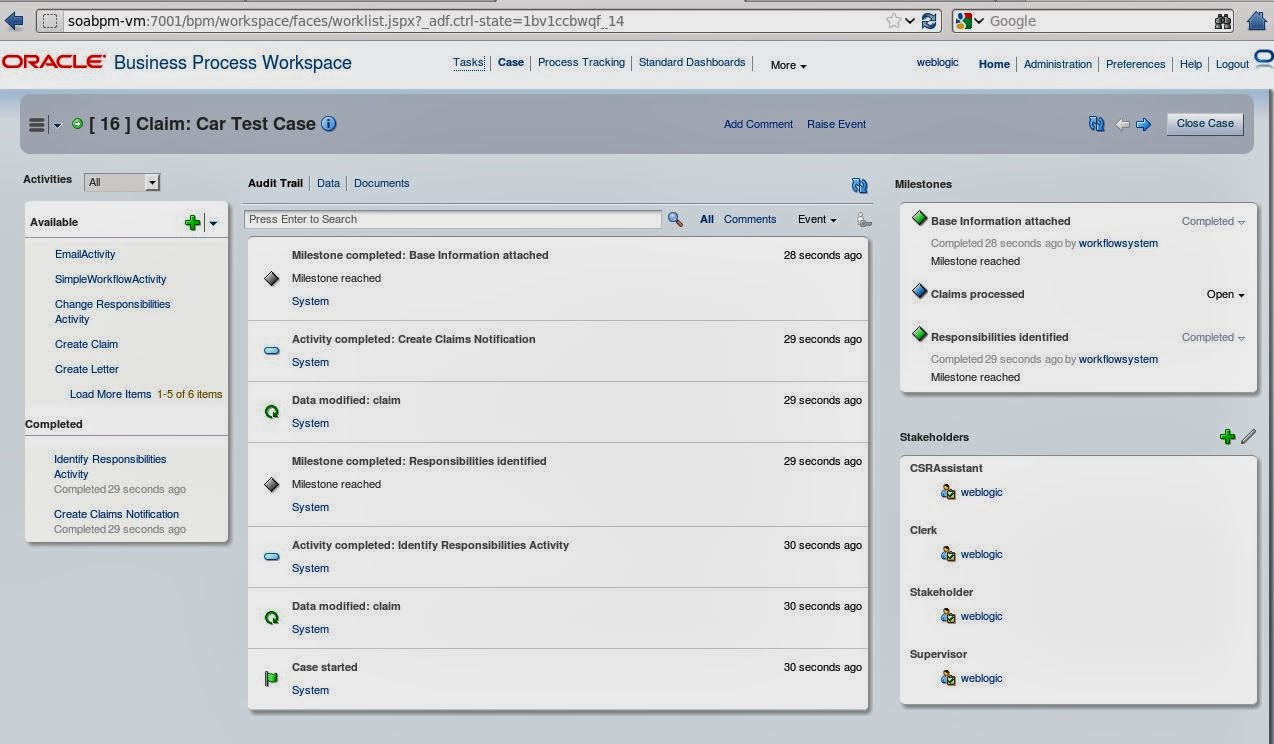
    Install the new User Interface for Oracle Case Management 11.1.1.7

    For all Oracle BPM & Case Management users a new User Interface is available (see SOA Community Blog). Below I describe briefly how to install it on a BPM 11.1.1.7 environment.

    To access the software please login to support.oracle.com and search for the following Patches:
    • Patch 17014142: SOA BUNDLE PATCH 11.1.1.7.1
    • Patch 17767877: CASE UI IN WORKSPACE

    1) Read the README-files carefully and perform the following steps for both patches:

    2) Set the ORACLE_HOME environment variable to SOA Home, eg:
    export ORACLE_HOME=/u01/app/oracle/middleware/Oracle_SOA1/
    Validate the result with => echo $ORACLE_HOME
     

    3) Add the appropriate OPatch to the system path, eg::
    export PATH=$PATH:/u01/app/oracle/middleware/Oracle_SOA1/OPatch
    Validate the result with => which opatch
     

    4) Run OPatch to apply the patch
    opatch apply

    Repeat the steps for the oracle_common-Home. Patch 17767877 needs to be applied on the Jdeveloper ORACLE_HOME as well.

    NOTE: YOU MUST APPLY THE SAME PATCH TO SOA AND oracle_common HOMEs AT THE SAME TIME. YOU CANNOT APPLY JUST ONE AS THIS WILL CAUSE UNPREDICTABLE BEHAVIOR.

    Additionally make sure that you installed:
    • Patch 14526899
    • Patch 14791221

    These two patches can be installed via Smart Update Utility. Start the tool under [MW_HOME]/utils/bsu, copy the extracted patches into [MW_HOME]/utils/bsu/cache_dir and apply the patches.

    If you performed all steps successfully, you should now be able to access your case instances from BPM workspace. Have fun with it!


    Friday, January 10, 2014

    BPM & Integration Days 2014


    Vom 24. bis 25. Februar 2014 präsentiert das Business Technology Magazin in München das große Trainingsevent für BPM & Integration.

    Lernen Sie in 18 Sessions und sechs Workshops tiefgehendes Know-how für die tägliche Arbeit und für strategische Entscheidungen in Ihrem Unternehmen. Die BPM & Integration Days konzentrieren sich diesmal besonders auf die praktischen Synergien von BPM mit Systemintegration, Mobile, BI und Cloud, gepaart mit Erkenntnissen aus vielen Jahren Projekterfahrung aller Referenten. Insgesamt erwarten Sie:
    • 18 Sessions und sechs intensive Workshops mit klarem Praxisbezug. 
    • Interessante Keynote und Speaker Panel am ersten Tag. 
    • Erstklassige Speaker & Experten vor Ort erleben. 
    • Eine ideale Plattform für Erfahrungsaustausch & Networking. 
    • All-inclusive-Verpflegung mit Erfrischungen und Snacks in den Pausen, leckeres Mittagsbuffet. 
    • Come Together am Montagabend für bestes Networking - mit Freibier und Snacks. 
    • Sie erhalten alle Materialien und Codebeispiele sämtlicher Workshops und Sessions in elektronischer Form zum bequemen Download. 
    • Sie erhalten ein persönliches Entwickler-Akademie-Zertifikat, das Ihnen Ihre erfolgreiche Teilnahme bescheinigt. 
    • Gratis-Magazine, kostenloser Internetzugang, hochwertige Laptoptasche u.v.m.

    Am ersten Tag freuen wir uns auf ein spannendes Programm mit drei parallelen Tracks zu "Modellierung und Ausführung", "Auswertung und Semantik", "Integration".


    Am zweiten Tag werden die wichtigsten Schwerpunktthemen in vier Halbtagesworkshops und in einem ganztägigen Workshop intensiv vertieft. 


    Ich freue mich als Sprecher der folgenden Sessions wieder mit dabei sein zu dürfen: 

    Ein Anlass den Sie auf keinen Fall verpassen sollten! Weitere Infos finden Sie auf www.bpm-integration-days.de.

    Tuesday, December 10, 2013

    Create a custom Case Activity in Oracle BPM Case Management

    In one of my previous posts I highlighted the new case management functionalites in Oracle BPM Suite. Case management enables you to define the different activities - a user can perform to achieve a goal - without defining the workflow process. For more details about ACM I recommend to download our "Adaptive Case Management in Practice" poster and to read the following articles:


    A case is always associated with activities which are performed as part of a particular case. Among milestones, data, events, stakeholders and documents the activities are a key element in Oracle BPM 11g Case Management. In the current release you can create case activities based on a BPM process, or a Human Task, or you can create a custom case activity based on a Java class. In this post I will explain the steps to create a custom case activity.

    Create a Custom Case Activity


    1. Create a new "BPM Application"
    2. Create a new "BPM Project"
    3. Create a "Composite with Case Management" component

    The above steps will result in a composite with the case and its exposed service and case rules. Now you can open the case definition and define your milestones, stakeholders, permissions, data, user events and so on. See the step-by-step "Hello World" example for more details. The Custom Activity Java class must implement the oracle.bpm.casemgmt.caseactivity.ICaseActivityCallback interface. The callback class must be part of the composite (as explained below), or must add it to the workflow customization classpath.

    4. Import the oracle.bpm.casemgmt.interface.jar from
    <MW_HOME>/Oracle_SOA1/soa/modules/oracle.bpm.runtime_11.1.1/


    5. Import the bpm-services.jar from
    <MW_HOME>/Oracle_SOA1/soa/modules/oracle.soa.workflow_11.1.1/

    6. Select File => New => Java Class and create the CustomCaseActivity Java class.


    7. Organize imports and add your custom logic in the "initiate" operation.

    package com.cattlecrew.acm.caseactivities;

    import java.util.Map;

    import oracle.bpm.casemgmt.CaseIdentifier;
    import oracle.bpm.casemgmt.caseactivity.ICaseActivityCallback;
    import oracle.bpel.services.bpm.common.IBPMContext;

    public class CustomCaseActivity implements ICaseActivityCallback {
        public CustomCaseActivity() {
            super();
        }

        public String initiate(IBPMContext iBPMContext,
                               CaseIdentifier caseIdentifier, String string,
                               Map<String, Object> map) {
           
            // Add activity logic here
           
            return "Called class CustomCaseActivity for activity => " + string;
        }
    }

    8. Create the case activity based on the Java class. See chapter 31 of the Oracle Fusion Middleware Modeling and Implementation Guide for Oracle Business Process Management for more details about config options and guidelines.


    9. Define your Business Rules.

    10. Deploy and test the Case composite. 

    Friday, November 15, 2013

    New SOA material available on OTN

    Listen to our 3-part podcast about "the state of SOA" and read our 13-part article series "Industrial SOA" on OTN


    Today I'd like to highlight some SOA material that has recently been published.

    1) Podcast Show Notes: Old Habits Die Hard in the New SOA World

    During Oracle OpenWorld 2013 in San Francisco Bob Rhubart from the OTN Architect Community invited Lonneke Dikmans, Ronald van Luttikhuizen, Hajo Normann, Torsten Winterberg, Guido Schmutz and me to participate in an informal roundtable discussion of what's happening in Service Oriented Architecture today. I really enjoyed it! You can download the conversation directly from OTN ArchBeat.  

    As you'll hear, the conversation ranged from the maturity of Service Oriented Architecture technology and tools, to the the lingering and typically self-imposed problems that can prevent organizations from realizing the full potential of SOA, to what SOA means in the era of *aaS, mobile computing, and big data.  

    After the recording we discussed our ACM poster
    [Hajo Normann, Torsten Winterberg, me and Lonneke Dikmans (L-R)]

    2) Article Series "Industrial SOA" - 9 from 13 articles already published

    In the last months already 9 from 13 "Industrial SOA" articles have been published on OTN and the Service Technology Magazine. The articles are covering topics like Service Categories, SOA Security, SOA and User Interfaces, Mobile Solutions and many more. The next upcoming article will be about SOA and Events. 

    Download them and share your comments e.g. via twitter by using the hashtag #industrialsoa.

    Tuesday, November 5, 2013

    Configure Auto-Recovery in Oracle SOA Suite

    Oracle SOA Suite 11g has some great features to recover faulted instances automatically. When a BPEL process flow errors out, it is retried with all its invocations. This is undesirable in some cases. For example if re-calling a composite results in duplicated data, data have been changed before the recovery is planned to be executed or you do not want to create too many composite instances in order to save the space in your SOAINFRA-schema. See below the different places where automatic recoveries are configured / disabled.

    1) Change RecurringScheduleConfig (see also the screenshot below) 
    • Right-click soa-infra (SOA_cluster_name) 
    • Choose SOA Administration > BPEL Properties 
    • Click "More BPEL Configuration Properties" 
    • Click "Recovery Config" 
    • Change values for RecurringScheduleConfig 
      • maxMessageRaiseSize = 0 
      • startWindowTime = 00:00 
      • stopWindowTime = 00:00 
    • Click Apply 

    2) Change StartupScheduleConfig (see also the screenshot below)
    • Right-click soa-infra (SOA_cluster_name)
    • Choose SOA Administration > BPEL Properties
    • Click "More BPEL Configuration Properties"
    • Click "Recovery Config"
    • Change values forStartupScheduleConfig
      • maxMessageRaiseSize = 0
      • startupRecoveryDuration = 0
      • subsequentTriggerDelay = 0
    • Click Apply


    3) Change GlobalTxMaxRetry
    The property GlobalTxMaxRetry specifies how many retries are performed if an error is identified as a retriable one. For example, after several web service invocations, if dehydration fails due to a data source error, then this is identified as a retriable error and all activities from the prior dehydration state are retried. If the activities being retried are not idempotent (that is, their state can change with each retry and is not guaranteed to give the same behavior), then multiple retries can be problematic.

    You can set GlobalTxMaxRetry to 0 in the Systems MBean Browser.
    • Right-click soa-infra (SOA_cluster_name)
    • Choose SOA Administration > Common Properties
    • Click "More SOA Infra Advanced Configuration Properties"
    • Click "GlobalTxMaxRetry"
    • In the Value field, enter an appropriate value
    • Click Apply

    Additional Information

    Wednesday, October 9, 2013

    Poster: Adaptive Case Management (ACM) in Practice

    Knowledge-driven processes are typically unpredictable in their execution. Experts working on them decide what’s the next best action to take. This is in contrast to traditional BPM, in which all possible paths of a process are predetermined and modeled into the process. Case management is a way to control and implement these unstructured processes. With the poster below we'd like to bring some of the key aspects of Adaptive Case Management (ACM) on one page.


    Feel free to download the PDF-version if you are interested in (login required):
    • What is ACM?
    • Why should I use ACM?
    • How can ACM user interfaces look like?
    • What are the main building blocks of an ACM solution?
    • How to visualize ACM cases with CMMN 1.0? 


    Send your feedback with #acmposter:

    Jürgen Kress
    Fusion Middleware Partner Adoption
    Oracle EMEA
    twitter.com/soacommunity
    Berthold Maier
    Enterprise Architect
    T-Systems International GmbH
    twitter.com/bmaier
    Hajo Normann
    SOA & BPM Lead ASG
    Accenture
    twitter.com/HajoNormann
    Danilo Schmiedel
    Solution Architect
    OPITZ CONSULTING Deutschland GmbH
    twitter.com/dschmied
    Guido Schmutz
    Technology Manager
    Trivadis
    twitter.com/gschmutz
    Bernd Trops
    Principal Solution Architect
    Talend GmbH
    twitter.com/berndtrops
    Clemens Utschig-Utschig
    Chief Architect Global Business Services
    Boehringer Ingelheim Pharma GmbH & Co. KG
    Torsten Winterberg
    Business Development & Innovation
    OPITZ CONSULTING Deutschland GmbH
    twitter.com/t_winterberg

    Wednesday, August 21, 2013

    Remove data in Oracle MDS

    The two main database schemas in the Oracle SOA Suite database repository are: <PREFIX>_SOAINFRA and <PREFIX>_MDS. Composite instance and runtime information are stored in the SOAINFRA schema. Commonly used metadata like WSDLs, XSDs, rules, fault policies, etc. as well as composite deployments are stored within the MDS schema. 

    With every deployment / import of the metadata artifacts a new document version will be created in the MDS. This means that re-importing an updated WSDL-file into the MDS does not delete the previous version of the document. Furthermore we sometimes need to remove unnecessary and unwanted files from the repository. If this is not considered you might end in problems like below:


    ORA-01654: unable to extend index DEV_MDS.MDS_PATHS_U2 by 128 in tablespace DEV_MDS
    ORA-06512: at "DEV_MDS.MDS_INTERNAL_COMMON", line 865
    ORA-06512: at "DEV_MDS.MDS_INTERNAL_COMMON", line 1021
    ORA-06512: at "DEV_MDS.MDS_INTERNAL_COMMON", line 1121
    ORA-06512: at "DEV_MDS.MDS_INTERNAL_COMMON", line 1216
    ORA-06512: at "DEV_MDS.MDS_INTERNAL_COMMON", line 1872
    ORA-06512: at line 1


    In order to avoid production problems because of a full MDS tablespace you should clean up the schema from time to time. This post explains the options that Oracle SOA Suite provides to remove contents from MDS.

    OPTION 1: Remove directories and files from MDS using WLST

    1) Start WLST from SOA_HOME/common/bin/wlst.sh.

    Example:
     
    [oracle@soabpm-vm ~]$ cd /oracle/fmwhome/Oracle_SOA1/common/bin 
    [oracle@soabpm-vm bin]$ ./wlst.sh 
    wls:/offline>
     

    2) Execute the following command: sca_removeSharedData('http://<soahost>:<soaport>', 'directory', 'user', 'password')

    Example (delete folder 'interfaces' and all its subdirectories and files):

    wls:/offline> sca_removeSharedData(‘http://localhost:8001’, ‘interfaces’, ‘weblogic’, ‘welcome1’)


    Note: With the command above you can just remove directories and files which are stored under "apps".

    OPTION 2: Remove directories and files from MDS using ANT

    Oracle provides some ANT scripts which can be used to integrate the "remove" command into your central build & deploy proccess. Just search for the "removeSharedData" command in ant-sca-deploy.xml. On the server this file is located under SOA_HOME/bin. You can also find the file in your JDeveloper install folder under MIDDLEWARE_HOME/jdeveloper/bin.

    1) Execute the command: ant -f ant-sca-deploy.xml removeSharedData -DserverURL=server.url -DfolderName=folder.name -Drealm=realm -Duser=user -Dpassword=password -DfailOnError=true/false

    Example (delete folder 'interfaces' and all its subdirectories and files):
     
    ant -f ant-sca-deploy.xml removeSharedData -DserverURL=http://localhost:8001 -DfolderName=interfaces"
     

    Note: With the command above you can just remove directories and files which are stored under "apps". See the Oracle Fusion Middleware Developer's Guide for Oracle SOA Suite for a detailed description of the parameters.

    OPTION 3: Remove files from MDS using WLST

    1) Start WLST from SOA_HOME/common/bin/wlst.sh

    Example:

    [oracle@soabpm-vm ~]$ cd /oracle/fmwhome/Oracle_SOA1/common/bin
    [oracle@soabpm-vm bin]$ ./wlst.sh
    wls:/offline>


    2) Connect to the SOA server: connect('user', 'password', 't3://<soahost>:<soaport>')

    Example: 

    wls:/offline> connect('weblogic', 'welcome1', 't3://localhost:8001') 
     

    3) Execute the command: deleteMetadata(application=’application-name', server=’soaserver-name’, docs=’absolutePath’)

    Example (delete all files in '/apps/interfaces' as well as the files in its subdirectories): 
     
    wls:/...> deleteMetadata(application='soa-infra',server='soa_server1',docs='/apps/interfaces/**') 
     

    Note: With the command above all files in directory 'apps/interfaces' will be deleted. Please note the double asterisk (**) at the end of the this parameter. The asterisk (*) represents all documents under the current directory. The double asterisk (**) represents all documents under the current directory and also recursively includes all documents in subdirectories. Furthermore see the Oracle Fusion Middleware WebLogic Scripting Tool Command Reference for a detailed description of the valid arguments.

    OPTION 4: Remove files from MDS using MBean Browser

    You can call the command "deleteMetadata" also from the Enterprise Manager / MBean Browser.

    1) Login to EM (http://host:port/em)
    2) Expand SOA
    3) Right-click on soa-infra
    4) Select Administration -> MDS Configuration
    5) Click Runtime MBean Browser
    6) Click Operations tab
    7) Click deleteMetadata operation
    8) Provide parameters:
          docs - list of entries to remove (fully qualified path, eg: /apps/interfaces/**)
          restrictCustTo - default
          excludeAllCust - false
          excludeBaseDocs - false
          excludeExtendedMetadata - false
          cancelOnException - true
    9) Click Invoke

    Note: See the Oracle Fusion Middleware WebLogic Scripting Tool Command Reference for a detailed description of the parameters.

    OPTION 5: Purge Metadata Version History using Fusion Middleware Control

    For database-based MDS, you can purge the metadata version history using the Fusion Middleware Control (Enterprise Manager). This operation purges the version history of unlabeled documents from the application's repository partition. The tip version (the latest version) is not purged, even if it is unlabeled.

    1) Login to EM (http://host:port/em)
    2) Expand SOA
    3) Right-click on soa-infra
    4) Select Administration -> MDS Configuration
    5) Scroll to the “Purge” section: enter a value in the Purge all unlabeled past versions older than field and click on the Purge button
    6) In the Confirmation dialog box, click Close

    Note: For more details see the Oracle Fusion Middleware Administrators Guide. Section 14.3.11.2 also explains how to purge metadata version history using WLST.

    How to view the MDS content

    After you removed files and/or directories from the MDS you might want to have a look at the actual content. The easiest way to do this is to create a MDS connection in JDeveloper. For more details see the Oracle Fusion Middleware Developer's Guide for Oracle SOA Suite section "43.4.2.1 Create a SOA-MDS Connection".

    Some additional information about the MDS


    Monday, April 22, 2013

    Industrial SOA

    Today I’d like to point you to a new article series termed as "Industrial SOA" authored by the "Masons of SOA". The series is dedicated to the exploration of contemporary SOA topics and issues and highlights some of the more recent innovations in practice that will especially be of interest to those who want to learn some techniques that go beyond the academic essentials.
    Abstract: “SOA and service-orientation have laid the foundation for a variety of emergent service technology innovations, while the original building blocks of SOA and service-orientation continue to evolve by embracing fundamental service technologies, concepts and practices. These new technology innovations do not replace service-orientation; they use it as their basis. Service-orientation continues to evolve towards a factory approach, towards industrializing integrated platforms, such as BI, master data management (MDM), mobile front-ends, BPM, adaptive processes, Big Data and Cloud Computing – all of which add architectural layers upon SOA-based infrastructure. All of these technologies can interface via standardized data and functions, published as service contracts, in order to avoid redundancy – that's service-orientation.”


    The 14 part series begins with a preface by Oracle veteran Juergen Kress, and then moves on to the first of thirteen articles. The articles are & will be published on OTN and the Service Technology Magazine.

    Send your feedback to @twitter/dschmied #industrialSOA.

    Monday, April 1, 2013

    New case management functionalities in Oracle BPM Suite 11.1.1.7

    Today I’d like to highlight a nice feature of the newest Oracle BPM Suite Release. I am very happy that Oracle enriched the Suite with certain Case Management functionalities that fit into the existing Service Component Architecture (SCA). In the past month I already had the chance to play a bit with the beta software. With this post I’d like to share some of my experiences. 

    Why Case Management?
    Business Process Management becomes more and more important. With BPM Suite processes can be modeled, implemented, simulated and executed in a multi-user environment. There are also a lot of different reports available to monitor processes during runtime. We see in our projects, that this kind of automation is especially valuable for processes which are based on routine work. Some examples are “Hiring”, “Order-to-Cash”, “Order Management”, “Travel Request Management” and so on.

    However - we also notice quite a high amount of processes, which are too complex and too flexible to model them in BPMN. We call it knowledge-intensive work. Of course if you have a lot of time you might be able to model almost everything but is it a benefit to have processes which are not readable anymore? How fast is your time-to-market? How easy is it to implement process changes? How can you support the job of the knowledge worker? Some typical domains with a high amount of knowledge-intensive work are Insurances, Banks, Healthcare, Civil Services and Government Agencies.

    Let me try to explain the need of case management with our RYLC example. RYLC stands for “Rent your legacy car” and it was introduced in a series of articles as an overall solution example. The main target of RYLC was to explain concepts like service categories, loose coupling, canonical data model, service security and much more (see SOA Spezial magazine for details). The graphic below shows the complete End-to-End RYLC process in BPMN notation from receiving the request, selection of the car, checkout of the vehicle, returning it, creation of the invoice and cash clearance. I highlighted the checkin-part of the process, which covers the return of the car. It is based on an asynchronous message exchange pattern - the process execution stops until the checkin is completed or canceled. In this stage several things can happen.
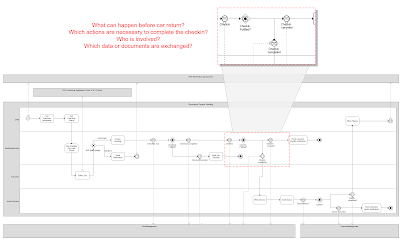
    BPMN Example - Rent your legacy car (RYLC)
    The happy path of the process would be that everything goes well and the customer returns the car at the date that has been agreed during the reservation. The extension of the rental period can trigger other actions which are necessary to satisfy the customer. In worst-case the customer might have an accident or somebody steals the car.   

    A lot of effort and time is necessary to bring all the mentioned varieties into the process. Examples like an accident will result in claim notifications and extended communication with the appropriate insurances. It is difficult to model each potential option. This is where Case Management comes into the game. It helps us to combine different milestones with the appropriate task actions, business rules, stakeholders, resulting events as well as data and documents (see the image below). During the car-checkin different milestones like “In Rental”, “Accident” (optional), “Stolen” (optional), “Returned” and “Approved” might occur. Each milestone consists of mandatory and optional task actions. Their execution order is defined by business rules. The task actions can be system driven (implemented as services) or user driven. Of course similar to BPMN some data and documents are exchanged in each step. Case Management is mainly controlled by the knowledge worker, which means that they affect the “flow” of the case. Therefore the definition of stakeholders and their permissions is another important aspect. Some example stakeholders in RYLC are the insurance holder, driver, car park assistant, front desk clerk and the rental manager. Based on the milestones and the task actions different events can occur that trigger new situations. Case management can support the knowledge worker with the right information (but the knowledge worker keeps the decision & process authority). Better and faster process decisions are the benefits of it.
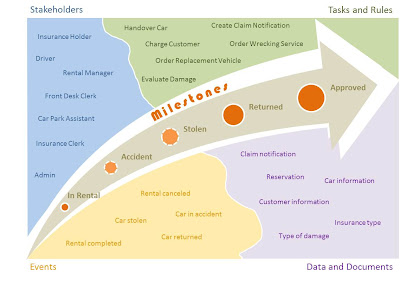
    Key aspects in Case Management
    To conclude: Case Management covers complex and unstructured knowledge-intensive scenarios where modeling is too expensive and time consuming. It is non-deterministic, which means that the case flow is dynamically determined at run-time. The case participants choose actions to meet goals. It can be used to enrich existing processes (like in the RYLC example above) or as separate and independent solutions. 

    How-to define a Case in Oracle BPM Suite?
    In Oracle BPM Suite 11.1.1.7 the Case component is introduced as a first class artifact with support for milestones, events, adhoc activities stakeholders and so on. Like BPMN, BPEL, Human Task, Rules, etc. a Case can be created by just dropping it on the composite level. After completing the wizard a case component, a business rule component and an interface (exposed service) is visible (as illustrated in the image below).
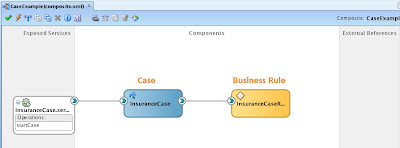
    Composite.xml with Case component
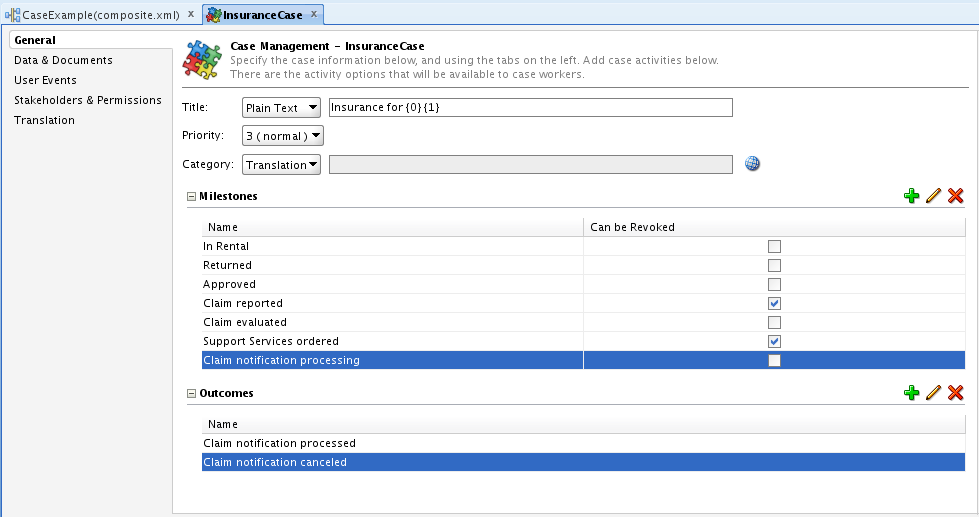
    For now a composite can have only one Case component. Double-clicking on the case directs you to the definition of the component. Here you can define the milestones, case outcomes, data & documents, stakeholders & permissions, user events and translations. The image below shows how milestones and case outcomes can be defined.
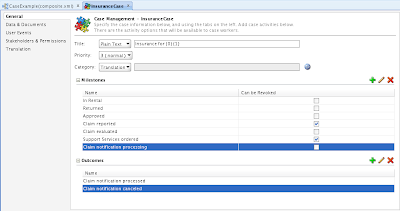
    Definition of a Case
    Furthermore it is necessary to define and implement the case activities. I noticed two ways of creating them. Option 1 is to open the wizard under “New > BPM Tier” and select “Custom Case Activity”. Option 2 is to promote an existing component as a case activity. For the article I decided to go for option 2 – so I promoted the Human Task “Evaluate Claim Notification”. A case activity does have its own definition – a file with a *.caseactivity extension. You can find an example with some of the parameters available for customization on the bottom of the next screenshot.
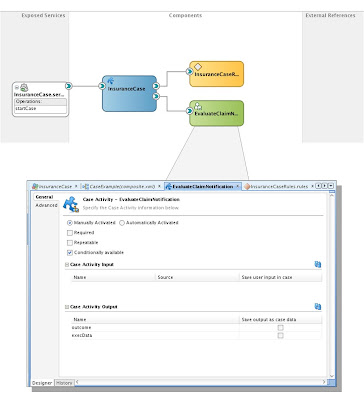
    Definition of a Case Activity
    Additionally the business rule created along with the case component needs to be configured. It comes with a set of predefined functions (e.g. activateActivity, withdrawActivity, reachMilestone and revokeMilestone), Facts and Bucketsets (e.g. TEventType, TMilestoneEvent, etc.). The definition of rules is necessary to handle all the different situations of the case. Typical examples are ACTIVITY_EVENTS which trigger new activities or milestones, USER_DEFINED_EVENTS which have been specified in the case definition file or MILESTONE_EVENTS which trigger the appropriate case activities (see the screenshot below). There are many different options and I hope that some documentation material is going to be published soon.
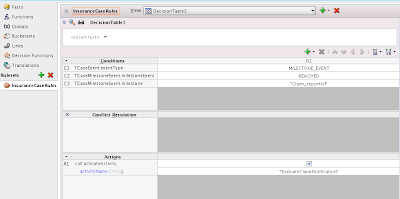
    Definition of a Case Rule
    During runtime you can take advantage of the monitoring capabilities from the Enterprise Manager – as you might already know from BPMN or BPEL processes. How many case-instances have been started in which time frame?  Which milestones have been reached? Did there a fault occur? Which rules and which activities have been activated? The screenshot below shows the instance information of Oracle’s "EURent" Case Management example.
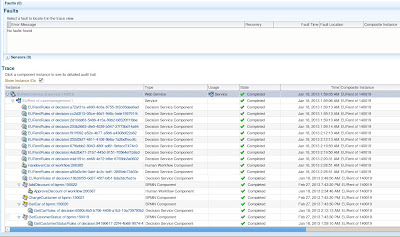
    Monitoring of Case instances in EM
    With the new Case Management functionalities BPM Suite confirms its outstanding position. I couldn’t wait to play with the software and I am really happy to demonstrate the new product capabilities to our customers. What I didn’t mention so far is the importance of user interfaces and tight integration with content management systems like WebCenter. So there is more to come :-)